If the requirements appear complete but the final action is missing, the problem may be an unfinished or missing garment piece rather than the brief itself. Open the Stuck or Can't Progress guide.
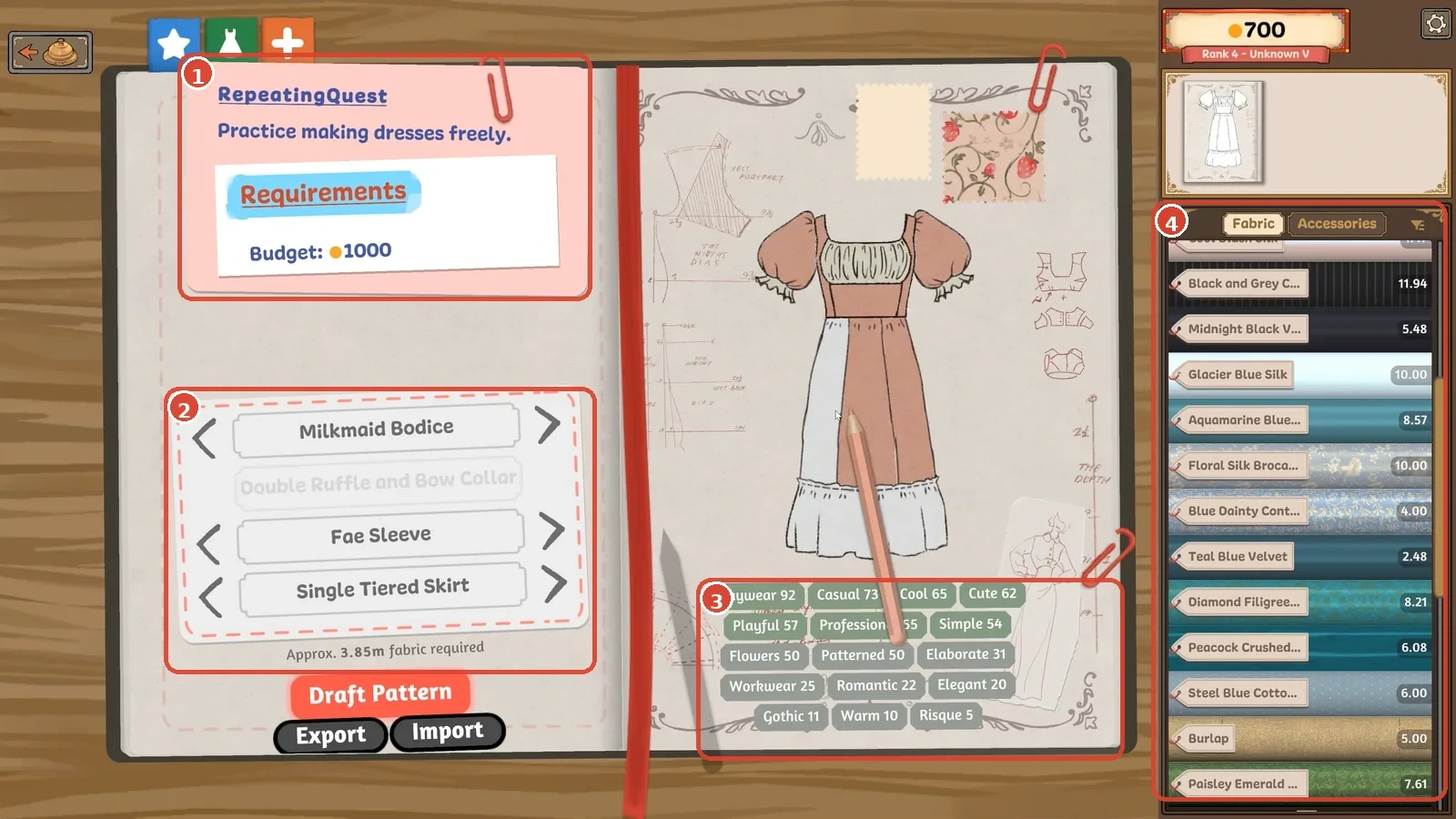
Commission interface annotated by Game Onramp from an official Cozy Lives / Free Lives press-kit screenshot. Compare the requirement labels with your current game screen.Annotated by Game Onramp using an official Cozy Lives / Free Lives press-kit screenshot.
Why small components can change your commission score
Official patch
Build 443 boosts panels on small components, such as collars and sleeves, when calculating color and fabric-type requirements. Previously those requirements used each panel’s raw share of total fabric area. Your past dress can therefore display a different score without a design change.
Tags already used this style of weighting. The new patch does not supply exact boosts or a guaranteed sleeve/collar threshold: change one item and read the commission feedback before spending more coin.
Open the intended commission page in the Sketchbook and page through other open orders if it looks empty.
Read required components, colors, fabric types and tags; click a component name to inspect available choices.
Confirm the active page before buying or cutting; use the live score to check the small component you actually chose.
Typed-bead trims, including tassel trim, now appear under the matching filter. Check the required type instead of assuming a visually similar trim qualifies.
Build 443 adds cotton, lace and gradient/shot silks, silver accessories, trims and skirt variants through campaign milestones, including retroactive unlocks. Check your current inventory; the notes do not list exact prices or milestones.
Build 403 addressed payment for accepted commissions. Check whether the customer accepted the garment and the actual payout separately from its score.
Choose the symptom that best matches the current dress. Each result separates brief interpretation from physical completion and preserves its evidence scope.
Most likely category
Physical completion or inventory state
Finish Dress is missing
Community-reported recovery + current UI check
Applies to / scope
Full Steam release; community reports are concentrated in launch-week builds.
Last source check
Try this first
1Confirm every pattern piece was cut.
2Confirm every piece is visible and placed on the mannequin.
3Confirm every required seam and finishing step is complete.
4Open the full troubleshooting branch before restarting anything.
Do not do yet: Do not start a new save.
Escalate when: All visible requirements and physical steps are complete on the latest build, but Finish Dress remains unavailable.
Commission interface annotated by Game Onramp from an official Cozy Lives / Free Lives press-kit screenshot. Compare the requirement labels with your current game screen.Annotated by Game Onramp using an official Cozy Lives / Free Lives press-kit screenshot.
Read the interface before spending coin
1Requirements card.Read the current brief first. This example shows a repeating quest with a budget condition, not a universal recipe.
2Component selection.Choose major components before estimating fabric and committing resources.
3Style and attribute preview.These labels preview the current design; they are not a universal pass guarantee.
4Fabric inventory.Available fabric and remaining metres constrain the plan.
The five checks to make before spending coin
1. Budget
Treat the budget as a limit on the complete plan. Pick major components first, estimate the material need, and leave room for any required finishing item.
2. Hard constraints
Check required material, colour, trim, accessory, count, and any other explicit restriction before optimizing style.
3. Quality
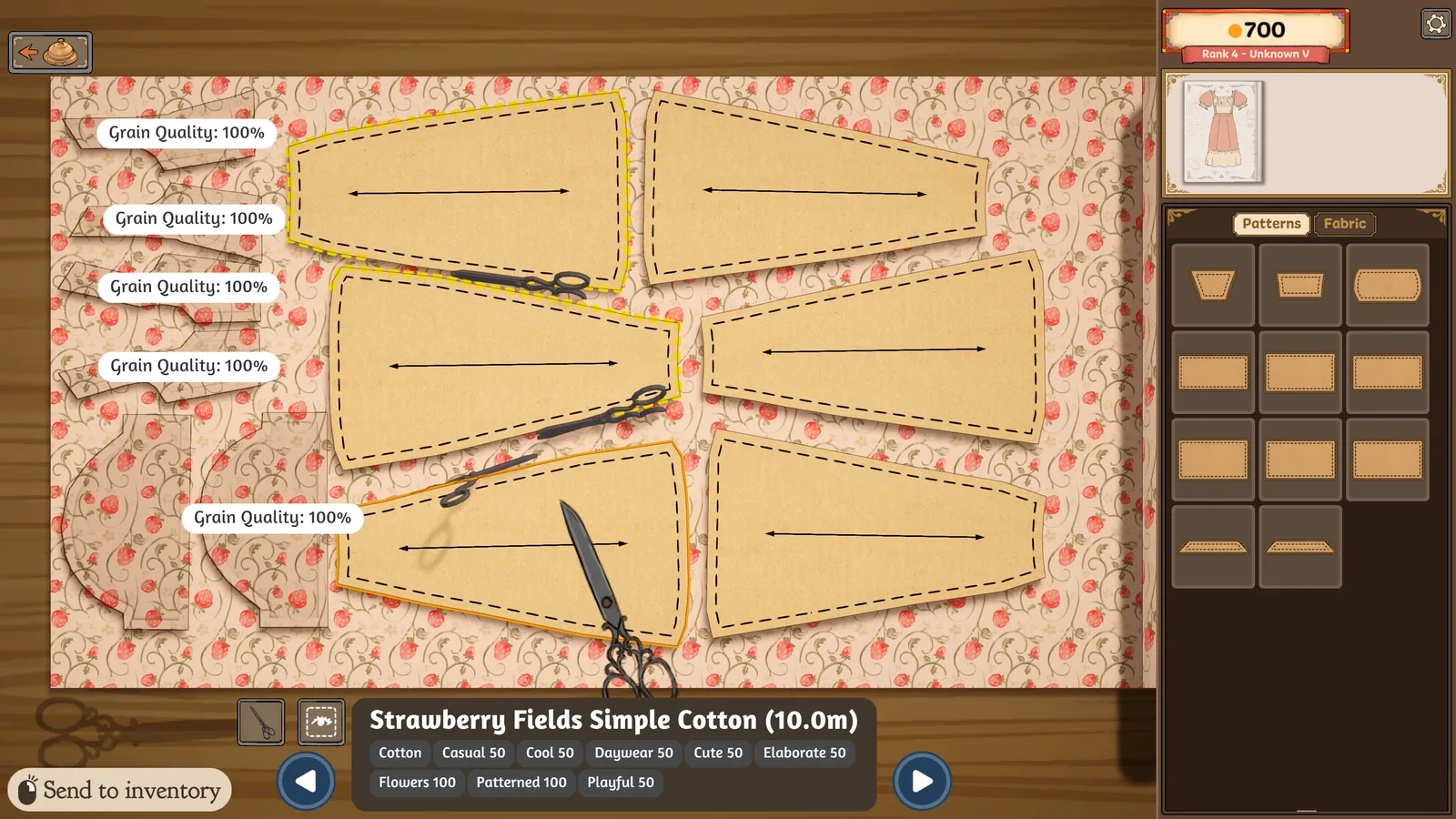
For a measured client commission, check Grain at cutting, Fit from measurements and mannequin setup, then Sewing. If Grain and Sewing look correct but Quality is short, inspect Fit before recutting or resewing everything.
4. Style and attribute targets
Use the comparison direction, symbol, and wording shown in the current build. Do not assume that every number means “at least.” Change one design variable at a time and watch the live preview.
5. Physical completion
A brief can look satisfied while the garment is still incomplete. Confirm that every panel was cut, every expected panel is present and placed, every required seam is sewn, and required finishing work is attached.
Official workflow image showing pattern placement and grain feedback.Official Dressmaker screenshot, courtesy of Cozy Lives / Free Lives.
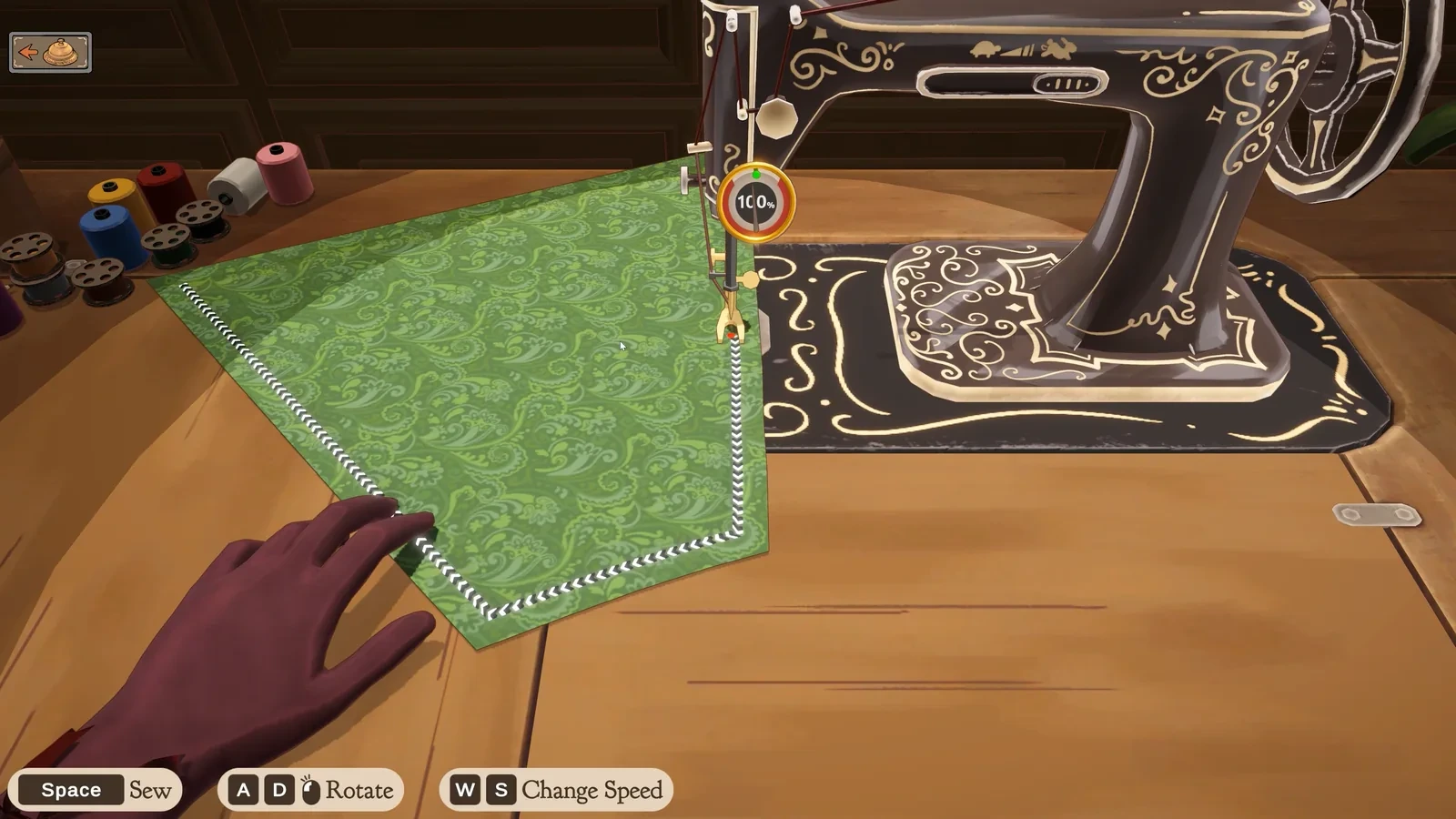
Sewing feedback shown in an official press-kit screenshot; use the installed build as the current source of truth.Official Dressmaker screenshot, courtesy of Cozy Lives / Free Lives.
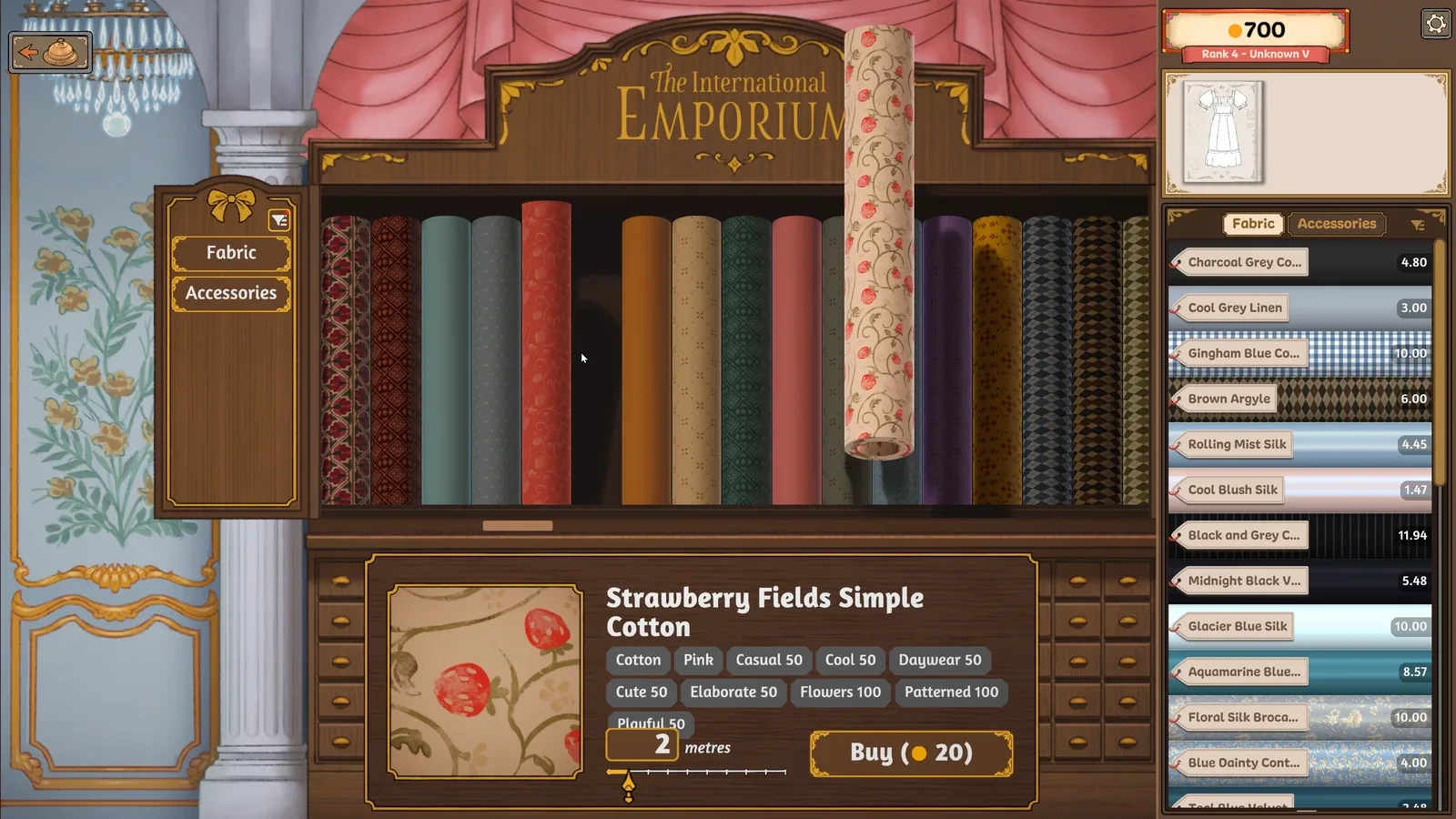
Material tags, quantity and price in an official Dressmaker press-kit screenshot.Official Dressmaker screenshot, courtesy of Cozy Lives / Free Lives.
Quality diagnosis: Grain, Fit and Sewing
Fit is a separate construction check for measured client commissions. Recheck the client measurements and mannequin setup if good Grain and Sewing still leave the final Quality short. A player in the linked report found measurement alignment was the missing stage; this does not prove every low score is a bug.
Quality and Style answer different requirements. Accessories and style tags can help Style, but do not substitute for a construction check. Independent references model Grain, Fit and Sewing as inputs; the exact weights and Fit equation have not been independently verified here.
Scroll across to compare all columns.
Stage
Check
Next action
Grain
Cutting feedback and pattern alignment
Inspect each cut panel before replacing all fabric.
Fit / Measurements
Client measurements and mannequin setup
Check tape alignment and the selected client values.
Sewing
Machine feedback and required seams
Correct the weakest visible stage rather than rebuilding everything.
Identify whether the dress belongs to a measured client.
Check Grain feedback, then inspect client measurements and mannequin alignment, then Sewing.
Change one stage at a time and compare the visible feedback.
If the readings still contradict the final score, preserve the brief, build and before/after screenshots and report the anomaly.
Read the direction before the score. MIN or “at least” is a floor; the value must meet or exceed it. MAX or “at most” is a ceiling. MAX 40 means 40 or lower, so 100/40 is above that maximum and remains red.
For fabric, colour, lace, and style counters, visual share is not a verified percentage formula. Community reports show that apparent area and accessory count can differ from the displayed value. Change one variable at a time, record the counter before and after, and treat the current build's live feedback as the operational source of truth.
1Identify whether the line says MIN, MAX, at least, or at most.
2Compare the current score in the correct direction.
3Change only one component, fabric, colour, or accessory variable.
4Keep a screenshot if the counter does not change or contradicts the requirement.
A safe commission-planning order
This order reduces the chance that you discover an impossible budget or missing condition after the fabric has already been cut.
1Read the whole brief.
2Record budget, hard constraints, quality, and style targets.
3Choose the major dress components.
4Preview how the component and fabric choices affect the requested qualities in your current build.
5Estimate how much fabric the plan needs.
6Buy only after the plan fits both the brief and budget.
7Arrange every panel before cutting.
8Recheck the brief before final delivery.
Why a commission can still look incomplete
Community-reported
A maximum or limit was read as a minimum.
A hard material, colour, or accessory condition was missed.
The design target passes but the dress is physically incomplete.
A panel is missing from inventory or not placed on the mannequin.
Players have reported launch-week cases where a cut piece appeared after saving, quitting, and reloading. This is a community-reported workaround, not an official guarantee.
Lace or trim is not counted
Build 403 officially fixed some lace-trim item tags, but later player reports still conflict. Read the requirement literally and distinguish Lace Fabric, a Lace Trim accessory, and ordinary Trim; similar names or appearances do not prove that the current build counts them as the same category.
Update first, then use the shop or inventory filter to verify the category and watch the live counter while changing one item at a time. If a correctly filtered item still does not count, preserve the dress and report the build, commission, item, counter, and screenshot.
Community replies disagree about filters, fabric, accessory type, and reload behavior. Treat those as diagnostic leads, not a universal item list or guaranteed recipe.
When the game does not explain a calculation
Use the live requirement counters and change one garment variable at a time. Exact scoring and colour-area formulas are not documented in the current official sources, so a single outfit from another player should be treated as an example rather than the only valid solution.
Frequently asked questions
Is there only one correct dress for a commission?
Use the current brief as the pass condition rather than treating a third-party outfit as the only solution.
Everything is green. Why can I not submit?
Check every pattern piece, placement, seam, and hard condition, then use the progress troubleshooting guide for missing inventory state or launch-build bugs.
Should I spend the full budget?
No official overview says you must spend all of it; preserve room for required materials or finishing items.
Version and sources
Applies to the full Steam release. Official sources establish the commission and crafting loop; launch-week completion issues come from repeated community reports and remain labeled as such.
Developer patch: trim/camera/cutting controls, small-component color and fabric weighting, Off-the-Rack actions, new materials and selected stability/accessibility changes. Original linked; full developer text verified on SteamDB patchnotes/25928714.
Current players report Quality remaining short despite repeated grain/sewing checks; one player reports inaccurate measurement alignment was the missing diagnostic stage.
Independent data-derived current-build reference models Fit/client measurements as a Quality input; used only to support the missing diagnostic dimension, not to publish exact formula.
 Game Onramp