 Game Onramp
OCTOBER 14 PATCH · SAFE RECOVERY
Gears of War: E-Day Known Issues & Fixes
Published Updated
Match the exact screen to the symptom table, then follow its safe steps.
October 14 official fixes are separated from earlier patch history and community workarounds.
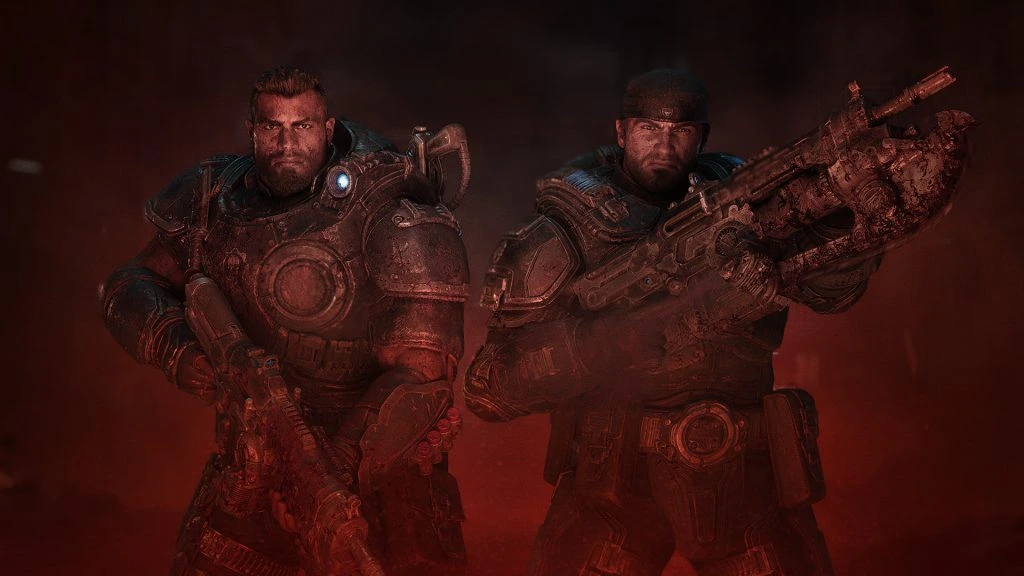
October 14: recover the right kind of Campaign credit
Official patchThe October 14 update fixes several War Journal, Achievement and co-op tracking issues. Previously missed collectibles and Campaign-completion rewards are not automatically restored. Keep your save and compare the in-game record before choosing a replay.
Your browser checkmarks record your own route planning; they cannot award a collectible or unlock an achievement. Confirm the result in the War Journal and on your platform after replay.
Scroll across to compare all columns.
| Symptom | October 14 patch / next action |
|---|---|
| A specific collectible is absent in the War Journal | Find its Act/Chapter in the tracker, return to the location and recollect it; check the in-game record after pickup. |
| A Campaign-completion skin or title was never granted | The official workaround is to start a new Campaign from a completed mission and replay that mission to re-earn the reward. Keep the existing save; this reward-specific workaround is not a universal achievement fix. |
| The item list is complete but an achievement/reward is still missing | Certain Campaign achievements and related rewards remain a known issue. Capture the item list, total and platform achievement; report the discrepancy to Gears Support. |
| Co-op progress is short | Install the update on both devices and compare host and guest records separately. The tracking fix does not establish automatic backfill of earlier awards. |
Chapter still blocked? Update, then retry the affected encounter
Official patchThe October 14 patch addresses the specific encounters below. Retry the checkpoint after updating. If the same blocker remains, record Act/Chapter, platform, installed update, host/guest role and the action that fails for Gears Support.
Scroll across to compare all columns.
| Chapter | Fixed blocker |
|---|---|
| Act 1 Chapter 1 | Unkillable enemies |
| Act 2 Chapter 1 | Combat encounter failing to initialize, and splitscreen progress after disconnecting |
| Act 3 Chapter 2 | Boss not returning to the encounter |
| Act 4 Chapter 1 | Out-of-bounds Wretch blocking progression |
| Act 5 Chapter 2 | Elevator softlock |
| Act 5 Chapter 4 | Bridge switch becoming un-interactable |
What screen are you seeing?
Official patchCommunity-reportedIndependent reportingOfficial sourceChoose the branch that matches the blocked action: startup sign-in, a campaign invite, or a progress counter. Install the current update before retrying the older fixed scenarios.
Scroll across to compare all columns.
| Symptom | Evidence state | Current safe action | Time / version scope |
|---|---|---|---|
| Startup: connecting to services / Optional Services taking a while / outdated online data | Community-reported; cause unknown | Read status timestamps; check platform network, sign-in and updates; restart once | Player reports October 7–10 |
| Co-op invite: fetching data for campaign systems / guest cannot Ready Up | Independent reporting; one-party workaround | Update both players for the October 14 co-op/Ready-Up fixes; compare hosts once if joining still fails | October 8 hands-on account |
| Marcus-Lancer / Mags-Ripper after connection or offline selection | Community error strings; official mapping unknown | Capture exact text and menu context for support; keep saves intact | PC reports October 9–10 |
| Campaign join-in-progress credit or specific objective blockers | Official fixes; Power Station has one cause fixed | Install the October 5 update or later; prefer October 14, then use the co-op or objective branch below | October 5 update |
| Siege Blitz Secure or Plaza Ruins Blitz extraction blocked | Fixed October 5 — official patch | Update before retrying; record mission and build if it recurs | October 5 update |
| Campaign progress counters disagree | October 14 tracking fixes; some Campaign awards remain a known issue | Compare the expanded list, Act counter and platform achievement; recollect missing items or use reward-specific replay; keep cloud saves | October 14 patch; earlier reports October 2–10 |
| Blocked after a very long uninterrupted session | Official known issue | Reload a checkpoint | Worldwide launch / October 5 update |
| Generated frames missing from Benchmark overlay | Official behavior | Do not compare the overlay number as total output FPS | Worldwide launch / October 5 update |
| Account still sees “too early” after worldwide launch | Repeated community report | Confirm entitlement and update, then restart the client or device | October 1 access window |
| Traversal stutter or crash outside the official list | Unresolved symptom | Record system and reproduction context, then use official support | Hardware and scenario specific |
Stuck connecting to services or loading Optional Services
Official patchIndependent reportingCommunity-reportedOfficial sourceThe Coalition confirmed DDoS-related online disruptions in its October 12 statement, reported by VGC. This describes the October 11–12 incident, not current availability or a cause of save loss. The October 15 browser check displayed Healthy/Available with a last update of October 12, 2026 at 2:21:19 PM (displayed time zone unspecified). That older timestamp does not confirm present availability. Check Gears Status now; Unknown or no timestamp also leaves availability unconfirmed.
For a startup connection block, check current service information and your signed-in account before retrying. Xbox reports from October 7–10 describe “This Is Taking A While…” at Optional Services and “fetching data… info may be out of date” in the menu; PC reports describe being stuck on “connecting to services.” These are player-reported symptoms, not a confirmed outage.
The online-data banner means information has not finished loading; it does not diagnose a corrupt Campaign save. Note whether only the banner remains or online actions are actually disabled. “Marcus-Lancer” while waiting and “Mags-Ripper” when selecting offline mode are reported strings: capture your exact spelling and screen rather than infer a cause from the name.
- 1Open Gears service status and its Xbox or Steam network link. Read the last-update time: Unknown or a missing timestamp cannot confirm health, and an older Healthy entry does not explain your current failure.
- 2Check the installed E-Day update and platform client update, then confirm the intended Xbox/Microsoft account session and game entitlement. Compare whether another online service on the same device connects.
- 3Check the device date and time. The October 5 Xbox authentication change covers a significantly incorrect clock; it does not establish clock skew as the cause of every later PC or Xbox error.
- 4Fully exit and reopen the game and platform client once. Record what changed; repeated reinstalls or save resets are not a diagnosis of a remote loading message.
- 5If the game offers offline mode, you can try that legitimate option while preserving progress. Availability and later War Journal or achievement synchronization are not guaranteed; record whether it works and contact support if online access remains blocked.
Co-op invite stuck on “fetching data for campaign systems”
Official patchIndependent reporting“Fetching data for campaign systems” or “the information may be out of date” describes a loading symptom, not proof that the servers are currently down or your save is corrupt. Check the timestamp on Gears’ current service notice and your platform’s sign-in status before retrying.
The October 14 patch fixes co-op progress tracking and a canceled Ready-Up vote incorrectly displaying Players Out of Range. Install the current required update on both devices before comparing a persistent join failure.
If both players can sign in but a guest cannot Ready Up after an invite, follow the campaign-party branch. An October 8 Dot Esports account described an invited player appearing in the party while campaign data loading prevented play. Switching which player hosted worked for that reporter’s party; this is a temporary anecdotal workaround, not an official or universal fix.
A VPN-off comparison is only a community suggestion relayed by that article. If you already use a VPN and can safely disconnect it without affecting privacy or work access, compare one join attempt, then restore your normal setup. The symptom alone does not justify router, firewall, DNS or Windows service changes.
- 1Confirm both players can access the online menu and have installed the current required game update.
- 2Have the other player start the lobby, then invite the original host once. Compare whether the guest can Ready Up and enter the campaign.
- 3If either direction fails, keep both players’ saves and progress records. Record storefronts, installed builds, host/guest roles and the exact loading text, then send the comparison to Gears support.
Scroll across to compare all columns.
| What you observe | Safe next check | If it persists |
|---|---|---|
| Neither player can sign in or reach online menus | Read the official service notice and its timestamp; compare platform sign-in status. | Wait for a dated service update or report the sign-in error. Do not treat a historical outage as current. |
| Both reach online menus; the guest stays on Fetching data | Confirm both builds, leave the party once and compare one fresh invite with the other player hosting. | Report storefronts, builds, host/guest roles and the exact text. Host switching is a reported workaround, not an official fix. |
| The mission loads but credit is missing | Compare that account’s expanded War Journal list, Act total and achievement progress. | Use the October 14 recovery branch; keep saved data intact. |
Protect your Campaign save: do not use Delete From Everywhere
Community-reportedOfficial sourceDo not use Xbox “Delete From Everywhere” as a routine fix for a short collectible counter or a loading banner. The October 9 community proposal is unverified, and its replies acknowledge that Campaign save slots are deleted even when some progression remains visible.
Xbox’s delete-everywhere control removes the selected saved data from the console and cloud; publisher support documents this platform distinction. Deleting only a local copy is a different operation, but neither is recommended here as routine troubleshooting. Another player’s retained unlocks cannot guarantee that your save or unsynchronized progress will survive.
Keep the save intact, capture the expanded item list and the short Act or achievement total, and use official support. The October 14 official guidance is to identify/recollect missing items or replay a completed mission for missing completion rewards; it does not recommend cloud-save deletion.
It says “too early” or E-Day will not launch
Official sourceCommunity-reportedWorldwide launch has occurred. Confirm the edition and account entitlement, restart or update the platform client, and check current service status. A Premium Upgrade is no longer required for standard worldwide access. Earlier October 1 access reports concern the historical Premium window.
- 1Confirm the launching account owns the game or has the applicable Game Pass access; check the edition in the platform Library.
- 2Check that the latest E-Day update is installed.
- 3Fully close and reopen the platform client or restart the device.
- 4If entitlement still fails, use official Xbox or Gears support and status channels.
I get blocked after a very long session
Official patchThe official launch workaround is to reload a checkpoint if a long uninterrupted session blocks an encounter or objective.
The game still appears to run after closing on PC
Official patchThe official launch notes say the remaining process can be viewed and ended in Task Manager.
Intel Arc: a scoped DX12 performance issue
Official sourceIntel 32.0.101.9034 lists lower-than-expected E-Day DX12 performance for Arc A-Series GPUs, Core Ultra Series 1 integrated Arc and certain Core Ultra Series 2 integrated Arc platforms. This is a known-issue entry, not a claim that the same driver fixes it or that every Intel GPU is affected.
- 1Identify the exact GPU and installed driver version; include the integrated GPU if applicable.
- 2Compare Intel and your device manufacturer’s current driver guidance. Do not assume a generic package is preferable to an OEM recommendation.
- 3If it persists, record settings, resolution, build and observed performance, then report through Intel/OEM or Gears support.
The Benchmark overlay shows lower FPS than expected
Official patchGenerated frames are not included in the Performance Overlay, so its number may be below effective output frame rate.
PC offline play still fails
Official patchThe official early-access restriction window ended at worldwide launch on October 6. The older note does not establish that offline functionality now works on every PC. If it still fails, record platform and build and report a post-launch symptom.
Co-op join-in-progress credit changed in the October 5 update
Official patchFixed October 5: receiving War Journal progress and Forge rewards earned before joining was a bug. The September 30 description no longer represents the current credit behavior.
The same update fixed missing expected Forge Discovery War Journal progress for some join-in-progress players. It does not define every host/guest credit edge case: compare the guest War Journal before and after joining rather than assuming full prior credit.
Campaign objectives addressed by the October 5 update
Official patchUpdate before retrying the affected chapter. These fixes cover specific objective states; they do not establish a fix for an expanded list and total counter that disagree.
- 1Install the latest required update and reopen the affected checkpoint or chapter.
- 2Compare the task notification and War Journal after the encounter. If the blocker recurs, record the chapter, platform, build and co-op role for support.
Scroll across to compare all columns.
| Objective symptom | Official patch status |
|---|---|
| Act 2 Chapter 2: Allfather’s Plaza objective does not update after other activities | Fixed October 5 |
| Act 2 Chapter 2: Black Raven Down Heavy Gear appears without a Vulcan | Fixed October 5 |
| Act 4 Chapter 1: side objective does not start when entered during introductory dialogue | Fixed October 5 |
| Act 4 Chapter 2: Power Station defense stays incomplete after visible enemies are defeated | One cause fixed October 5; other causes are not ruled out |
Online and Versus fixes in the October 5 update
Official patchInstall the update before retrying these scenarios. For an Xbox authentication failure, also check that the system date and time are correct.
- Fixed October 5: some Social matches remaining on Waiting for players.
- Fixed October 5: the Bilefrog-Kalona split-screen sign-out after suspending and resuming.
- Fixed October 5: a Demolition bomb stuck defusing when the player is eliminated as the interaction begins.
- Xbox authentication handling improved for a significantly incorrect system clock.
Campaign progress counters disagree
Official patchCommunity-reportedPlayers report an expanded collectible list showing every item while an Act total or achievement remains short. This can indicate a tracking mismatch rather than an undiscovered pickup. The October 5 patch covered specific earlier blockers. The October 14 patch addresses several War Journal and Achievement tracking issues, but earlier missing collectibles need recollecting and some awards remain a known issue. Use the October 14 recovery table above to distinguish a missing item from missing award credit.
- 1Compare the expanded item list, the Act or Chapter total in the War Journal, and your platform’s achievement progress for the same save.
- 2Record the Act, missing count, platform, game version, and whether you were a co-op host or guest. Capture the disagreeing screens for support.
- 3Compare each account separately when a friend’s counter differs. Re-picking an item with a different host is only a community anecdote: use normal gameplay, preserve the existing save slot and recheck the counters without resetting either account.
- 4If a specific item is absent from the expanded list, use its chapter route. If the list is complete, check official updates and report the mismatch before committing to a full Campaign replay.
What to include in your Gears support report
Official sourceSend enough context to reproduce the symptom and distinguish an account, online-session or progress-tracking problem. Use the official support channel; keep passwords, account tokens and entire save files out of public comments.
- Exact on-screen message or error code, a screenshot, timestamp and timezone.
- Xbox or Windows device, Steam/Xbox storefront, installed build and update, and whether account sign-in and entitlement are working.
- Whether the menu opens, offline mode works, other online services connect, and the service-status page’s displayed update time.
- For co-op: each player’s platform/build, who hosted or joined, whether Ready Up was available, and results of the safe comparison.
- For War Journal: Act/Chapter, expanded item-list count, aggregate count and platform achievement for the same account/save.
- The safe steps already tried and their results, rather than an assumed cause.
Performance, traversal stutter or crash outside the official list
Official patchOfficial sourceCommunity-reportedThere is no verified universal fix. Record hardware, resolution, preset, upscaler, frame generation, platform and exact symptom before escalating to official support.
- GPU / CPU and available memory
- Resolution and graphics preset
- Upscaler and frame generation state
- Storefront or client
- Exact symptom and reproduction point
- Do not treat unsourced registry or configuration edits as official fixes.
Already changed since beta
Official patchOlder beta advice can be stale. The official launch notes report stability and performance work, a PC mouse and keyboard input delay fix, expanded Max FPS choices, optional multi-frame generation and Advanced Shader Delivery support at launch for AMD hardware.
- PC Max FPS options include 30 through 240 and Unlimited.
- Advanced Shader Delivery launched for AMD hardware; NVIDIA support was announced for later in October.
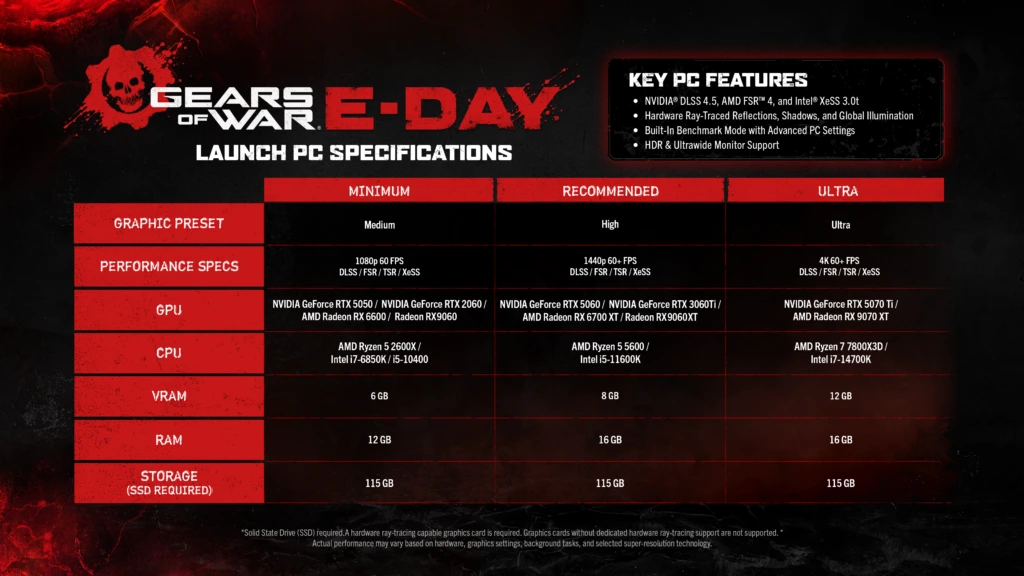
Sources and version notes
Sources
- October 14 Patch Notes — Ranked, Campaign recovery and Horde fixesOfficial patch
Ranked launched October 13; placement, tracking and Horde fixes; recollect missing items; mission replay for Campaign completion rewards; some achievements/rewards remain a known issue.
Retrieved
- VGC — October 12 report of The Coalition DDoS statementIndependent reporting
Historical official statement reported by VGC: DDoS-related disconnects and login disruption; not current service health or evidence of save loss.
Retrieved
- Gears of War: E-Day – Surviving the First Night of EmergenceOfficial source
Worldwide release on Xbox Series X|S, Xbox on PC, Game Pass and Steam; collectible audio cue and side objectives.
Retrieved
- Intel Graphics 32.0.101.9034 release notesOfficial source
E-Day DX12 lower-than-expected performance is a known issue for Arc A-Series and Core Ultra Series 1 / certain Series 2 integrated Arc platforms.
Retrieved
- Player reports — connecting to services, Marcus-Lancer and Mags-RipperCommunity-reported
PC players describe sign-in loading failures on Steam and the Xbox app; error strings are community reports without a verified official cause.
Retrieved
- Player reports — Optional Services and outdated online dataCommunity-reported
Xbox players report slow Optional Services loading, This Is Taking A While and outdated online-data messages after worldwide launch; incident scope is unknown.
Retrieved
- Dot Esports — campaign data-fetching error and one-party host comparisonIndependent reporting
A reporter could join a friend’s campaign but the reverse host arrangement failed. VPN-off advice is a community suggestion relayed by the article, not an official repair.
Retrieved
- Unverified player workaround — Xbox cloud-save deletion riskCommunity-reported
A player proposes deleting saved data for a counter mismatch; a reply acknowledges campaign save slots are deleted. Reported retained progress is not a safety guarantee.
Retrieved
- Publisher support — Xbox local-versus-cloud save deletion controlsOfficial source
Bethesda support explains that Xbox Delete everywhere removes saved data from console, cloud and other consoles. Only the platform-control distinction applies here; its game-specific reset advice does not apply to E-Day.
Retrieved
- Gears service status — check the displayed update timeOfficial source
Official service categories and Xbox/Steam status links. The Oct 15 browser read displayed Healthy/Available with an Oct 12, 2026 2:21:19 PM timestamp (displayed timezone unspecified); check current timestamps rather than infer an individual connection or a confirmed outage.
Retrieved
- Gears support — report a persistent issueOfficial source
Official support entry point for game issues; send exact symptom and platform/build context without public credentials.
Retrieved
- Player report — expanded collectible list and Act 4 counter disagreeCommunity-reported
Players report a complete expanded list but a short Act total or achievement. A different co-op host is an anecdotal recovery report, not an official or universal fix.
Retrieved
- Player report — Act 2 collectible counter is one shortCommunity-reported
A player reports collecting 38 Act 2 collectibles while the War Journal counts 37; this establishes a reported symptom, not its cause.
Retrieved
- October 05 Patch NotesOfficial patch
October 5 fixes for Campaign join-in-progress credit and specific objectives, one Power Station cause, Horde Blitz objectives and extraction, and online issues.
Retrieved
- Gears of War: E-Day is Available in Early Access Today, Watch the Launch Gameplay TrailerOfficial source
Early Access timing, worldwide launch timing, platforms, and official launch trailer.
Retrieved
- Emergence Begins – TomorrowOfficial patch
Launch known issues, beta-to-launch tuning and fixes, Season 1, and Ranked timing.
Retrieved
- Gears of War: E-Day Has Gone Gold, Pre-Install Begins September 29, Full PC Specifications RevealedOfficial source
Final launch PC requirements and the official PC specs image.
Retrieved
- ITS GO TIME. E-DAY IS HERECommunity-reported
Repeated community language around Premium Upgrade and too-early access blocks.
Retrieved
- For Everyone trying to play Oct. 1st.Community-reported
Launch access and update friction with conflicting community workarounds.
Retrieved
- Guys guys how the performanceCommunity-reported
Current player language around stutter, FPS and hardware-dependent performance.
Retrieved
Evidence note: October 14 fixes and remaining award issues checked October 15. Earlier player reports and the host-switch workaround retain their dated scope; DDoS history is independently reported, not live status.